Balancing work across a team has never been easy. Projects shift. Priorities change. People go on leave or get pulled into last-minute tasks. And without a clear view of who’s doing what and how much they’re carrying, things fall through the cracks—or pile up on someone’s plate. That’s where workload management tools come in. These tools give managers and teams a way to see how work is spread out, adjust assignments, and avoid burnout without guessing or micromanaging.
In 2025, with remote setups and blended work models sticking around, having the right tool in place can make a huge difference in how well teams function. Here’s a closer look at 15 of the most reliable and widely used workload management tools for teams in 2025. Each tool brings its own strengths, and they cover a range of work styles and team structures.
15 Best Workload Management Tools for Teams in 2025
ClickUp
ClickUp continues to grow its reputation as a flexible project and workload management platform. With workload charts, timeline views, and customizable dashboards, teams can track capacity in real time. The tool suits both task-heavy teams and those managing sprints or campaigns. Time tracking and goal-setting features help keep everything in sync.
Trello (with Premium Features)
While Trello started as a simple kanban board, it has matured into a tool that supports complex team needs. Trello’s “Dashboard View” in the premium tier gives insights into workload distribution. Paired with Butler automation and calendar integrations, it works well for teams who want visual clarity without overcomplication.
Asana

Asana remains a go-to for cross-functional teams. Its “Workload” feature, available on Business and Enterprise plans, shows each team member’s assigned tasks over time. Managers can shift work easily by dragging tasks between people, and color-coded workload bars make overbooked schedules obvious at a glance.
Monday.com
Monday’s workload management system stands out for its visual dashboards and ease of use. It’s well-suited for teams that need a bird’s-eye view of what everyone is working on. Workload is displayed through capacity planning views, and users can filter by roles, timelines, or departments. Updates happen in real time as tasks change.
Teamwork
Built with client services and agencies in mind, Teamwork blends project management with workload and time tracking. Its resource scheduler helps teams see future availability, and built-in timers provide accurate reports. It’s especially useful for teams billing clients and balancing internal priorities at the same time.
Wrike
Wrike offers robust workload management through its “Resource Management” features. Gantt charts, work schedules, and effort-based planning give project leads strong control over distribution. The “Effort” allocation model—where tasks are weighted by time or complexity—helps prevent uneven workloads from building up unnoticed.
Smartsheet
Smartsheet gives spreadsheet-style views with added power. Its Resource Management module lets teams plan capacity by hours, days, or weeks. It integrates well with other systems, making it ideal for operations and planning teams that need a mix of data tracking and people management.
Float
Float is designed specifically for resource and workload planning. It focuses on who’s working when, and what they’re booked for. The scheduling interface is fast, clean, and intuitive, making it a favorite for creative studios, dev shops, and consulting teams. It syncs with calendar apps and time tracking tools for accurate forecasting.
Resource Guru
This tool focuses on time-based workload planning. Instead of just task lists, it lets teams assign hours or percentage blocks of someone’s day to different projects. The scheduling grid shows how much capacity remains, helping managers avoid overbooking. It’s a good fit for teams that run multiple projects in parallel.
WorkOtter
WorkOtter is aimed at project-heavy teams and PMOs. It blends Gantt charts, resource heatmaps, and time tracking into a centralized dashboard. Teams can see how many hours or days each member has left in a week and reassign tasks accordingly. It’s not flashy, but it’s solid and built for managing effort, not just deadlines.
nTask
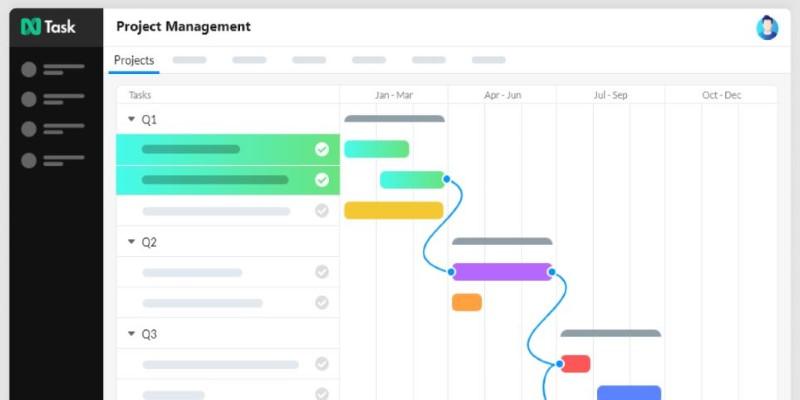
nTask is a lightweight yet capable tool with built-in time tracking and workload planning features. Teams can view how much work is assigned per team member and adjust based on effort, not just task count. It’s affordable and works well for smaller teams or startups scaling their operations.
Resource Management by Smartsheet (10,000ft)
Previously known as 10,000ft, this tool—now part of Smartsheet—offers a broad view of people and projects. It supports advanced filtering, skill-based matching, and forecasting. The strength lies in planning future workload without waiting for tasks to be assigned. This is especially valuable for consultancies and planning-heavy teams.
Hive
Hive blends traditional project tracking with time tracking and workload views. Its “Resourcing” feature lets team leads see everyone’s assigned hours and task distribution. Adjustments are simple and sync instantly with the project timeline. The platform also supports automated reporting and team health analytics.
Zoho Projects
Zoho’s project management platform includes tools for workload tracking through its resource utilization charts. It also supports custom roles, task dependencies, and time logs. For teams already using Zoho CRM or Finance, it fits well into the broader ecosystem, giving full context for how project and sales cycles interact.
Planview AdaptiveWork (formerly Clarizen)
This enterprise-grade tool is ideal for large, complex teams or departments. It offers advanced workload tracking through role-based assignment, dynamic Gantt views, and effort estimates. Planview’s strength is in long-term planning and portfolio-level visibility, giving companies control over both day-to-day work and larger program goals.
Conclusion
Workload management is no longer about making lists and hoping for the best. In 2025, it’s about visibility—knowing what’s happening, spotting overload early, and making small changes that keep the entire team moving forward. With the right tool, managers don’t have to guess who’s overbooked or underutilized. The answers are right in front of them. These 15 tools each offer that in their own way. What matters is finding one that fits how your team works—not one that adds more to their plates. With a clearer picture of capacity, teams make better decisions, move faster, and reduce the everyday friction that slows work down.