Apple’s public betas attract a lot of attention, especially when they promise flashy new features or visual changes. iOS 26 is no exception. But installing a beta version of any operating system comes with tradeoffs, even if it looks stable from the outside. Before rushing to try it, there are a few things worth thinking through.
Testing out pre-release software can seem exciting, like getting a sneak peek at the future. But the novelty fades quickly if your daily tools stop working, or if your phone slows down at the wrong moment. iOS 26, like previous versions, carries risks that often go unspoken in the initial wave of hype. Here’s why holding off might be the smarter move this time around.
6 Reasons to Hold Off on Installing the iOS 26 Public Beta
The Bugs You Don’t Expect Are the Ones That Hurt Most
Beta means unfinished. Apple stabilizes public betas more than developer previews, but that doesn’t mean smooth sailing. Core features often run fine. It’s the odd glitches that leave you stuck. Think random screen freezes during calls, broken widgets, or Touch ID becoming unresponsive until a restart. These aren’t everyday bugs. They’re sporadic, which makes them harder to reproduce or fix.
Some testers report lag when opening the keyboard in search, or delays with the lock screen clock syncing. These things won’t brick your phone, but they chip away at the daily flow. A fraction-of-a-second lag isn’t just annoying, it makes you question everything the device used to do effortlessly.
And there’s no patch cadence you can count on. You wait until Apple releases the next beta, hoping your issue made the fix list.
App Compatibility Lags Behind the OS
Your favorite apps don’t update for betas. They update for public releases. Developers often hold off testing or pushing patches until closer to the final version of iOS. That gap leaves room for crashes or partial functionality in everyday apps.
Banking apps, in particular, are notorious for breaking under betas. Face recognition might not launch, or the keyboard may fail to load in secure text fields. Music production tools sometimes refuse to open entirely due to security entitlement mismatches.
Even social apps like Threads or TikTok can misbehave if camera access, background sync, or push notifications falter. It doesn’t have to be catastrophic—just enough to wear down your patience.
Battery Drain Isn’t Just a Side Effect, It Changes Behavior
Battery life always takes a hit in early iOS betas. Even with a fresh install, the system churns in the background. Indexing. Logging. Analyzing crashes. You’ll see the battery percentage drop faster, especially in idle states.
It’s not just shorter usage time—it changes how you interact with your phone. You start dimming the screen sooner. You skip tasks that usually feel casual, like uploading a set of photos or watching a 10-minute clip. You reach for the charger mid-day, whether you’re home or out.
This low-grade anxiety over battery life isn’t dramatic, but it makes your phone feel less like a tool and more like a variable to manage.
iCloud Services Sometimes Drift Out of Sync
iCloud is tightly woven into iOS now. Notes, Messages, Photos, Shortcuts, Safari tabs—they all lean on iCloud in real-time. Beta builds of iOS 26 have shown occasional syncing issues, especially with Reminders and iCloud Keychain. Items appear delayed or duplicate, or edits don’t save across devices.
This becomes a real issue if you’re bouncing between a Mac, an iPad, and an iPhone. You write a quick note on your phone, then open your MacBook expecting it to be there—and it isn’t. Or worse, it's an older version.
When you’re in the middle of a task, even one missed sync is enough to slow you down or break momentum. And since syncing is invisible, there's no clear fix—you either wait or manually retype.
Downgrading Isn’t as Clean as It Sounds
Apple technically lets you revert from the iOS 26 beta to the latest stable iOS 25 release. But that process involves wiping your device. You can’t just “roll back” and keep going. Unless you made an archived backup before upgrading—which most people don’t—you’re left starting from scratch.
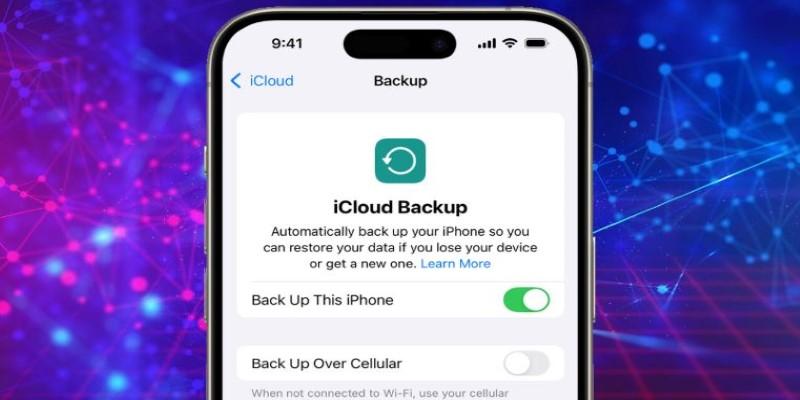
That means re-downloading apps, reconfiguring settings, losing Health data, and potentially losing access to messages or files saved since the switch. For a casual user, that’s a major hurdle. Even with iCloud backup, some items won’t restore cleanly.
There’s a psychological toll, too. Once you’re in the beta, you feel locked in. Even if performance tanks or something breaks, the effort to leave becomes a deterrent. That’s not a great spot to be in with your daily device.
The “New” Features Might Not Feel That New
Every iOS release has headline features. But sometimes the big changes feel more like refinements than breakthroughs. With iOS 26, much of what’s new appears to be in personalization, accessibility, and background intelligence. For example, smart adjustments to how apps show notifications at night, or deeper context awareness in voice dictation.
These aren’t bad additions, but they’re subtle. You don’t necessarily feel them during normal use. And they don’t change how the phone operates in any dramatic way.
If you're expecting a fresh home screen layout or a reimagined Messages app, you might walk away underwhelmed. That’s fine in a stable release. But if you’re dealing with quirks and workarounds in exchange for features that don’t really impact your flow, the math starts looking less favorable.
Final Thoughts
It’s tempting to install the iOS 26 public beta just to see what’s new. There’s a certain appeal to running software that feels exclusive. But day-to-day experience matters more than novelty. If your phone is how you work, how you plan, how you stay in touch, it’s probably not the right time to trade stability for early access. You can always join later, once the bugs settle and third-party support catches up. But right now, waiting isn’t about playing it safe. It’s about letting your phone keep doing what it does best—without getting in its own way.