Every few years an app shows up that tries to rethink how athletes track their training. Many lean on glossy dashboards or motivational slogans. The Outsiders takes a quieter approach. It feels like something built by people who spend as much time on long runs and interval sets as they do behind a keyboard.
The first moments with it reveal a focus on precision and recovery rather than badges or weekly streaks. Serious athletes tend to look for small edges hidden in daily decisions, and the app aims to surface those signals without trying to steer the user’s habits. Its appeal grows once the data starts to accumulate, since patterns that usually hide behind generic charts settle into view.
A Training Diary Built Around Hard Effort
The heart of the app is a stress model tuned for athletes who already understand their sport’s vocabulary. It does not try to predict performance with grand claims. It simply quantifies load with a level of detail that separates a true threshold session from a steady endurance day.
Many trackers collapse everything into a single color or score, which leaves athletes guessing whether a long climb on the bike should be treated like a tempo run. The Outsiders tackles this by analyzing heart rate patterns and pacing variance instead of relying on fixed formulas.
A middle distance runner might notice this during a ladder workout. They upload the session from Apple Health or record directly in the app. Instead of a flat number, they see tension spikes that reflect each rep separately. The app also marks transitions where form drifted or recovery periods ran short. These notes help the runner adjust the next attempt. The benefit comes from the nuance. The tool respects how unruly real training can be. GPS dropouts, erratic warmups, or small surges all register realistically rather than being ironed into a smooth curve.
There are limitations. The app depends heavily on clean heart rate data. Wrist sensors that wobble during sprints can skew readings, so athletes using chest straps will get more accurate results. The developers acknowledge this, which builds trust. They include a small panel that highlights suspected anomalies so users can decide whether to keep or discard a portion of the workout.
Recovery Tools That Look Past Simple Rest Days
Many apps treat recovery as a binary state. Rest or train. The Outsiders brings in a gentler gradient. It uses HRV pulled from the iPhone or Apple Watch and blends it with sleep quality markers. Instead of calculating a neat readiness score, it looks at short term patterns. Some athletes respond poorly to abrupt intensity after nights of fragmented sleep even when their HRV appears fine. The app flags these mismatches.
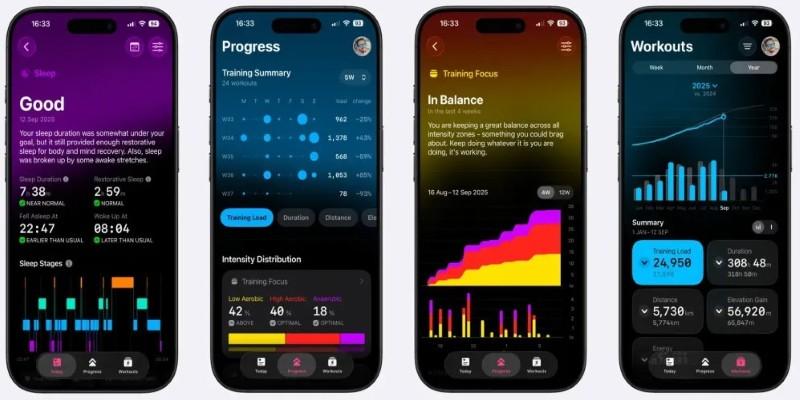
A cyclist preparing for a multi day stage race might appreciate this. They wake up feeling ordinary but notice a small alert suggesting caution. When they check the details, they see that their HRV rebounded but their sleep depth cratered in the early hours. The app shows similar historical events and how the following training days played out. This context helps the cyclist adjust plans without discarding the entire session. Maybe they keep the ride but drop the planned VO2 intervals.
These tools are not perfect. HRV collected from the wrist can drift during periods of high stress unrelated to training. Travel days, altitude changes, and even irregular meals often confuse the signal. The Outsiders does not hide this. When the app detects factors that usually distort HRV, it explains the uncertainty so the athlete does not mistake noise for insight.
A Data Hub That Reduces Friction Instead of Creating It
Most serious athletes eventually end up with data scattered across platforms. Watches collect one type of metric, power meters handle another, and apps like TrainingPeaks or Strava hold long term histories. The Outsiders tries to sit quietly within that mix. It pulls from Apple Health and lets the athlete export structured files without forcing another ecosystem on top of what already works.
The design helps during a training block with mixed disciplines. A triathlete might start the morning in the pool, go for a short brick run, and finish the day with a strength session. None of these activities traditionally fit together cleanly.
Swim sensors rarely match run metrics, and strength sessions often appear as generic “other” workouts. The app tags these sessions with notes that reflect energy and tension rather than modality. Over a week the athlete sees which combination of sessions tends to overload their legs, even when the sport changes.
A realistic limitation is that the app currently depends on Apple’s ecosystem. Athletes using Garmin or Polar devices can still sync through HealthKit bridges, but advanced metrics like running dynamics or cycling balance may not transfer. This is not a deal breaker for most users on iOS, yet it shapes how deeply the app can interpret certain workouts.
Small Details That Matter to People Who Train Year Round
What sets The Outsiders apart is how it handles the unglamorous parts of training. Many apps celebrate peak days, but athletes spend far more time navigating plateaus, fatigue, and messy schedules. The Outsiders treats those moments with a kind of practical respect. It shows when training monotony creeps in and when load becomes inconsistent in ways that break adaptation cycles.
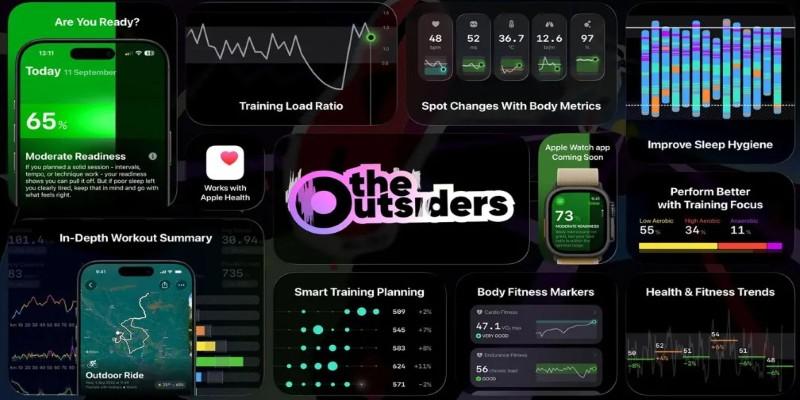
Imagine a rower moving through winter training. They spend weeks in similar heart rate zones and volumes, convinced that the routine builds a base. The app surfaces small drifts, noting that stroke rate changes and subtle fatigue markers have begun to diverge from previous weeks. This prompts the rower to adjust, maybe adding variety or shifting intensity. These nudges resemble the feedback a coach might give during an informal check in.
Conclusion
The Outsiders arrives at a time when many fitness trackers aim for the widest possible audience. This app moves in the opposite direction. It favors clarity over entertainment and long term insight over instant gratification. Athletes who already understand their training load will likely appreciate the honesty of its data. It does not try to tell them how to live. It simply gives them better instruments for the work they already do.