Buying a new smart TV is one of those upgrades that feels instantly gratifying. The colors are sharper, the interface is faster, and everything finally syncs with the devices around your home. But out of the box, most TVs still feel a little bare. The menus are loaded with pre-installed apps you’ll never open, while the ones you need are nowhere in sight.
Here are four free apps that consistently make a new TV feel fully functional from day one. They each solve a different problem, and not all of them are obvious. But once they’re installed, the overall experience changes quickly.
Plex – For organizing your own media library
Smart TVs are packed with streaming services, but they’re terrible when it comes to local media. Movies on a hard drive, home videos, old concert recordings — they just sit on your computer unless you use something like Plex.
Plex turns your laptop or PC into a home media server. Once set up, the app on your TV connects to that server and displays everything in a clean, categorized interface. Movie files get poster art and trailers. TV shows sort themselves by season. Even random folders of video clips get organized automatically, as long as the filenames have something to work with.
There’s a bit of setup involved on the computer side. You’ll need to install Plex Media Server and point it toward the folders you want to share. The first scan can take a while, especially with large libraries. But once it’s done, watching your own media on the TV becomes just as easy as using Netflix.
Some features, like mobile sync or DVR support, sit behind a subscription. But for standard playback on a TV, the free version handles almost everything. Just don’t try running the server on an old laptop that overheats easily — transcoding large files in real time takes some power.
JustWatch – For keeping track of where to stream things
Searching for a movie across multiple apps on a smart TV is painful. You either type the name into each service one by one or rely on the TV’s universal search, which often returns half-baked results. That’s where JustWatch comes in.
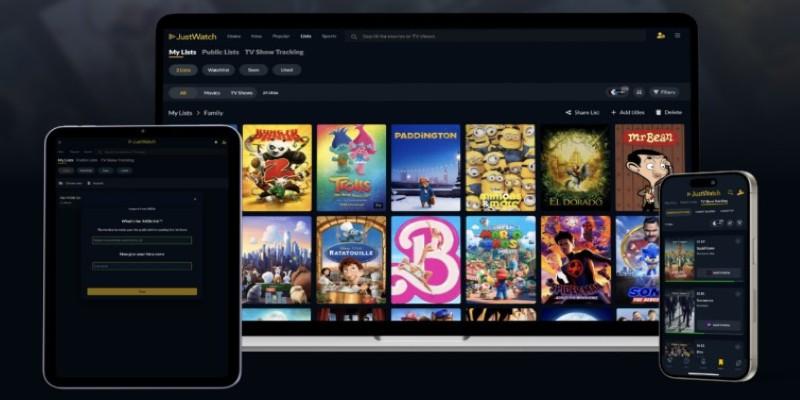
It’s not a streaming app itself. It’s a guide. You open JustWatch, type the name of a show or film, and it tells you where to find it — whether it’s free, included in a subscription, or available to rent. It also lets you filter by resolution, genre, release year, and even whether a movie is trending.
One real use case: checking where a film is available before pressing play on a rental. Some streaming services quietly move titles in and out of their libraries, so a film you almost paid $4.99 to rent might be available through a service you’re already using.
JustWatch updates its listings pretty quickly, but there’s a small delay now and then — especially for newly added or expiring titles. It’s not perfect, but it beats toggling between apps, guessing what's available where.
Pluto TV – For flipping channels without thinking too hard
There are nights when scrolling through endless menus just doesn’t feel worth it. That’s the itch Pluto TV scratches. It replicates the feeling of flipping through channels, no planning required.
Pluto offers hundreds of free live-streaming channels arranged by genre — action movies, old sitcoms, documentaries, and even home improvement reruns. These aren't traditional networks; most are themed playlists pulled from licensed content libraries. Still, the setup works. You drop into a channel and let it run in the background.
The app is especially useful when there’s a group in the room and no one wants to pick something. Sports highlights, cooking shows, or old game shows can fill the gap without much thought.
Expect ads — a lot of them. And you won’t find any premium first-run content. But it’s free, doesn’t require an account, and makes a TV feel like a TV again, not just a streaming portal.
Tubi – For free movies and shows you’d actually watch
Free streaming platforms often lean too far into obscure territory. Tubi strikes a better balance. It offers a rotating catalog of familiar movies and series, mixed with deep cuts and oddities that are fun to stumble on.
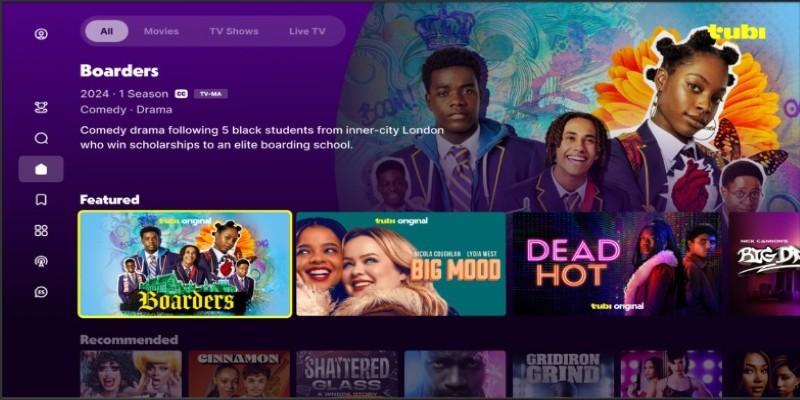
You won’t find new theatrical releases, but there’s a decent selection of well-known films from the last couple of decades. Think cult classics, early 2000s comedies, and the kind of thrillers cable used to air on weekend afternoons.
The interface is clean and faster than some paid services. No sign-up is needed unless you want to create a watchlist. The biggest downside is the ads — they interrupt like clockwork every 15 to 20 minutes. But they’re shorter than most live TV commercial breaks, and for something free, it’s a tradeoff that’s easy to live with.
Tubi also updates regularly. Content rotates in and out, so the catalog doesn’t feel static. There’s a growing section of niche documentaries, vintage cartoons, and international titles as well, which helps it stand out. It’s the kind of app that’s good to keep installed even if it’s not your primary service.
Conclusion
New TVs look great, but the out-of-the-box experience rarely makes full use of the screen. These four apps add useful functions that most default systems overlook. Whether it’s browsing your own collection, finding where to stream something, or just having something play in the background, each one fills a common gap. You don’t need to install a dozen things right away. But these four cover the basics — content discovery, local media, live channels, free on-demand viewing, voice-friendly navigation, and smooth playback integration — without cluttering your home screen or asking for monthly payments. That’s a good starting point for making a smart TV feel smart.