WhatsApp is more than just a messaging app. Over time, it’s become a tool for sharing all kinds of things—from documents to photos and quick videos. But not everything needs to stay in a chat forever. If you're sending a photo or video that only needs to be seen once, WhatsApp’s “View Once” feature is useful. Whether it's a password on paper, a location photo, or a short clip meant to be temporary, this feature helps you share without leaving a trace. Here’s how it works and when it’s worth using.
What is the “View Once” Feature on WhatsApp?
The “View Once” feature in WhatsApp is designed for moments when a photo or video doesn’t need to linger in a chat forever. When you send something using this option, the recipient can open it only once. After it’s viewed, it disappears from the conversation and won’t be saved to their gallery or camera roll. Once it’s gone, neither you nor the other person can bring it back.
You’ll recognize disappearing media by a small “1” icon, which shows that it can only be opened a single time. The feature works in both private and group chats. In group settings, every member gets their own one-time chance to open it, which means the media doesn’t vanish for everyone at once but on an individual basis.
This option is handy for quick, casual sharing—like sending a password scribbled on paper, a fleeting snapshot, or a lighthearted clip. It keeps chats cleaner and less cluttered, giving you more control over what stays in your message history. The only requirement is an updated version of WhatsApp, and the feature is ready to use.
How to Send Disappearing Photos and Videos?
To use the disappearing photo or video option, open a chat and tap the paperclip icon on Android or the “+” icon on iPhone. From there, you can take a new photo or video, or choose one from your device.
Before sending, look near the text box for a circle with a “1” inside. Tap it to activate “View Once” mode. The icon will become solid, meaning the media is now set to disappear after a single view. Then hit send.
When the media is delivered, it won’t show a preview in the chat. The recipient taps it, views it once, and that’s it—it disappears after closing. If read receipts are turned on, you’ll see when they’ve opened it.
If the recipient doesn’t open it within 14 days, the photo or video will expire automatically. In that case, it’s no longer viewable. You can’t forward or star a “View Once” message, and it won’t show up in any backups or galleries.
The sender also loses access to the image or video once it's sent. If you're trying to save a copy for your own reference, send it to yourself or keep a version before sending it as “View Once.”
What to Know Before You Use It?
While the disappearing photo feature adds a layer of convenience, it’s not completely private. WhatsApp doesn’t block screenshots or screen recordings, and there’s no alert if the recipient captures what they see. If you’re sharing something sensitive, know that it can still be saved outside the app.

For group chats, the “View Once” setting works individually—every person in the group can open the photo or video one time. If your message is meant for just one person’s eyes, it’s best to send it in a private chat.
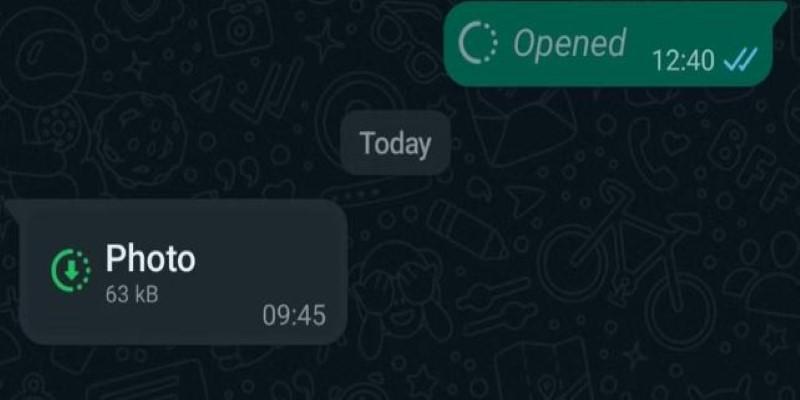
Disappearing media also doesn’t leave a preview or thumbnail. The chat just shows the word “Photo” or “Video” with an “Opened” label. No image remains once it’s been viewed, which helps reduce clutter in longer chats.
This option is different from WhatsApp’s disappearing messages feature, which deletes entire messages after a set time. “View Once” applies to specific photos or videos and gives you more control over what you send, one message at a time.
If you don’t see the option, update your app. Older versions may not support the “View Once” feature.
When to Use Disappearing Media in WhatsApp
There are plenty of moments when a disappearing photo or video makes sense. You might be sending a one-time password, showing a paper note, or sharing a personal image that doesn’t need to be saved. It’s great for quick, single-use content.
It’s also useful for casual moments where a permanent photo isn't necessary. This can include a snapshot of something funny, a temporary location marker, or even a reminder note you’ve scribbled on paper. It keeps chats from getting filled with throwaway images.
Sending disappearing media also gives you peace of mind that it won’t automatically be stored. With less clutter in your gallery or someone else’s, both sides keep their storage cleaner.
Still, it’s good to stay cautious. If you're sending anything truly private, remember the feature doesn’t block screen captures. While WhatsApp discourages saving this type of content, there’s no enforcement behind it.
Used thoughtfully, it’s a helpful tool. It cuts down on unnecessary files in your chat history while giving you a little more control over how your shared content is handled.
Conclusion
Disappearing photos and videos in WhatsApp are a quick way to share something without leaving a trail. Whether it’s a temporary image, a joke, or a single-use code, “View Once” helps keep your chats tidy and lightweight. The media disappears after being viewed, doesn’t take up space in galleries, and can’t be forwarded or saved within the app. While it isn’t foolproof for privacy, it’s useful for everyday moments when permanence isn’t needed. If you're looking for a simple way to share without the extra clutter, this feature offers an easy and convenient solution right inside WhatsApp for daily communication needs.