Most timers are just clocks in disguise. They tick, they buzz, and then they wait for you to restart them while your mind drifts. Tomato 2 is different. It doesn’t try to change your entire workflow or convince you that productivity is about color-coded graphs or 14-tab dashboards. Instead, it does one job well: it helps you focus.
Whether you’re writing, coding, studying, or working through your inbox, this free Pomodoro app gives you just enough structure to stay on track without getting in your way. No logins. No feature bloat. Just a clean, crisp way to stay present with your work.
How Tomato 2 Uses the Pomodoro Technique?
Tomato 2 is based on the classic Pomodoro Technique, which breaks work into 25-minute focus sessions followed by short breaks. After four sessions, you take a longer break. This structure is designed to prevent burnout and keep your brain fresh. Unlike other methods that ask you to multitask or time every second of your day, the Pomodoro approach is realistic. It assumes your brain needs rest and rewards you with it—without turning your work into a marathon of unchecked distractions.
When you open Tomato 2, the interface shows a large, simple timer. No gimmicks. You click "Start" and the 25-minute countdown begins. During that time, you're encouraged to do one thing only—focus on your task. At the end of the session, the app chimes and prompts you to take a five-minute break. After four sessions, it gives you a longer break of 15 or 20 minutes, depending on your settings. That rhythm of work and pause helps maintain energy and attention throughout the day.
Tomato 2 doesn't come loaded with pop-ups, achievements, or push notifications trying to drag you back in. Instead, it respects your time by making sure every session is intentional. It's built for people who just want to work and keep their heads clear.
What Makes Tomato 2 Different from Other Pomodoro Apps?
There are hundreds of Pomodoro timers out there. Some are web-based, others are locked behind paywalls, and many come packed with features that few people ever use. Tomato 2 stands out because it stays simple. It’s available for macOS and doesn’t try to be everything—it just helps you focus.

The interface is clean and minimal. You won’t find graphs, mood trackers, or customizable themes. Instead, Tomato 2 gives you one large visual timer and optional menu bar access. You can control the app entirely from the menu bar if you want—starting and stopping timers without opening a separate window.
One of its best features is the automatic transition between work and break sessions. Many Pomodoro timers require manual interaction after each session, breaking your flow. Tomato 2 keeps things smooth, rolling into the next phase without you having to click or think. If you want more control, you can pause or skip any session at will.
It also includes simple statistics that track your completed sessions each day. There’s no pressure to hit a certain number, but the visual count gives a quiet sense of progress. You’re not competing with anyone. You’re just watching yourself show up, one session at a time.
Another thoughtful detail: Tomato 2 doesn’t require an internet connection. It works offline, so you’re not tied to a server or dependent on syncing with a cloud account. Your focus doesn’t depend on bandwidth or software updates.
Using Tomato 2 to Build a Daily Focus Routine
Tomato 2 isn’t a productivity miracle. It’s a tool that works well when paired with clear goals and regular habits. Start your day with a list—three or four key things you need to complete. Open Tomato 2 and use it to time each task. Commit to working for one session at a time. Don’t aim for a full day of perfect productivity. Just show up for the next 25 minutes.
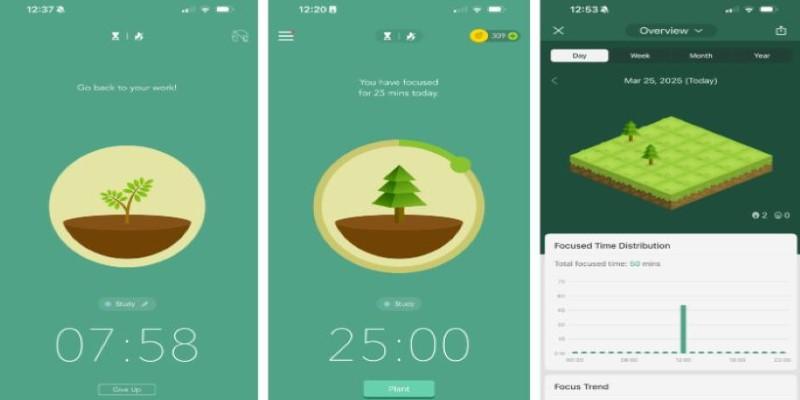
Once you start using it daily, Tomato 2 becomes a rhythm. You’ll notice how your focus deepens during each session. Distractions fade because your brain knows there’s a break coming soon. You don’t feel like you have to rush or stretch your willpower thin. The regular pauses help you reset and come back fresh, especially during longer stretches of work.
If you get stuck or feel scattered, Tomato 2 gives you a container to sit in. Instead of trying to “get in the zone,” you just start a session and trust that the focus will come. Sometimes the timer itself is enough to break through procrastination. You’re not promising to work all day—you’re just committing to this next small window.
The app can also be useful when paired with other routines. For example, it works well with writing sprints, email batching, reading sessions, or even cleaning your workspace. The point isn't just to finish tasks. It's to work with presence and attention, without losing your pace.
Over time, this kind of rhythm helps you build work habits that feel sustainable. You stop relying on pressure or panic to get things done. Instead, you return to the timer, do your 25 minutes, then take a real break.
Conclusion
Tomato 2 proves that staying focused doesn't require complex tools or packed schedules. By sticking to the simple rhythm of the Pomodoro Technique, you get just enough structure to keep going without feeling overwhelmed. It's free, lightweight, and built for people who want to work without constant interruptions. Whether you're writing, studying, or handling day-to-day tasks, this free Pomodoro app keeps your attention where it matters—on the work in front of you. If you're looking for a clean, no-fuss way to build better focus habits, Tomato 2 is a small tool that makes a noticeable difference.