Most people are reluctant to pay for apps, and not without reason. Free versions are often good enough or at least seem that way until you dig a little deeper. But some Android apps really do justify the cost, not through flashy features, but by quietly solving problems that keep cropping up day after day.
These are 5 that consistently hold up, not just for what they offer out of the box, but for how they handle real-world usage, especially when other solutions fall short or add extra friction you didn’t ask for in the first place.
5 Paid Android Apps That Are Truly Worth the Money
Tasker ($3.49)
Tasker doesn’t do anything flashy on its own. It’s a behind-the-scenes operator—quiet, complex, and, for some, a little intimidating. But if you’ve ever wanted your phone to adapt to your habits, this is one of the few apps that gets close.
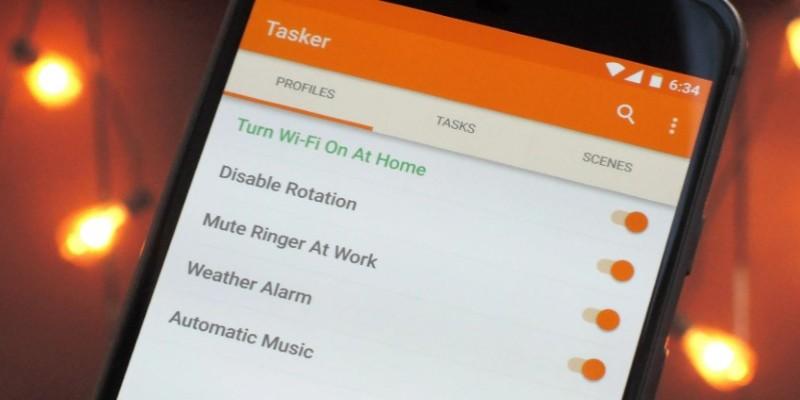
Say you plug your headphones in after 9 PM. With Tasker, your phone can automatically lower the screen brightness, open your meditation playlist, and mute all notifications except for select contacts. Or maybe you want Wi-Fi to shut off when you leave home, then turn back on when you return. Tasker can do that too, without draining your battery in the process.
The learning curve is real. The UI feels stuck in 2015, and it takes a bit of trial and error to build more complex actions. But once you get your profiles dialed in, Tasker essentially becomes your phone’s invisible assistant—one that works exactly how you want it to.
Solid Explorer ($2.99)
The default file managers on Android devices have improved, but they’re still clunky when it comes to advanced tasks. Solid Explorer isn’t just better; it actually makes managing files enjoyable, especially if you juggle local storage, SD cards, and cloud accounts.
Its dual-pane interface makes it easy to drag and drop between folders. It supports FTP, SMB, WebDav, and popular cloud services like Dropbox and Google Drive—all in one place. You can even encrypt sensitive files with AES256 right from the app, no third-party add-ons needed.
It’s especially handy for anyone who downloads a lot of PDFs, APKs, or images and hates digging through the Downloads folder. Power users will appreciate root access support, but casual users benefit too, especially when trying to find large files eating up space.
The only caveat is that the UI can get dense. It offers a lot of control, which means a lot of settings. But once you get familiar with the layout, it's one of those apps that makes other file managers feel like a chore.
Sleep as Android (Premium Unlock ~$19.99/year)
Plenty of sleep tracking apps throw charts at you. This one tries to do something useful with them.
Sleep as Android tracks sleep cycles using your phone’s sensors or connected wearables. But what sets it apart is its smart alarm that tries to wake you during light sleep—those few minutes when it’s easier to get up without that groggy fog. You set a window (say, between 6:30 and 7:00 AM), and it’ll pick the best moment to nudge you awake.
If you use a Galaxy Watch or Wear OS device, the tracking gets even more accurate. And there are features like snore detection, sleep talk recording, and even an optional CAPTCHA to dismiss your alarm so you don’t accidentally go back to sleep.
It’s not perfect. The UI feels busy, and it takes some fine-tuning to get the smart wake-up working well. But for people who struggle with restless nights or hate how their alarm jerks them awake, it’s one of the few apps that’s actually made waking up feel less awful.
KWGT Kustom Widget Maker (Pro Key $4.49)
Android is known for customization, but KWGT takes that idea and goes a layer deeper. It lets you create custom widgets from scratch—fully tailored to how you want information displayed on your home screen.

This isn’t just resizing a clock or changing colors. You can build widgets that show battery percentage in a radial graph, upcoming calendar events, system stats, or even dynamic text like song lyrics or weather summaries. All styled how you want, down to padding, font weights, or touch actions.
It’s especially good for people who like a clean home screen but still want quick access to relevant info. For instance, a single-line widget showing your next meeting and the weather feels lighter than separate blocks.
That said, KWGT requires some tinkering. And while there are plenty of free widget packs to get you started, creating your own from scratch takes a bit of time. But if you’ve ever been annoyed by how rigid most widgets feel, this app gives you full control without rooting your phone.
Moon+ Reader Pro ($7.99)
There are free ebook readers, and some of them are fine. But Moon+ Reader Pro is for people who read a lot—and want the experience to be as close to physical books as possible, minus the weight.
Where it stands out is in the small things. Text alignment that doesn’t feel weird. Highlight colors that aren’t overly bright. Fine-grained control over line spacing, paragraph indentation, and font rendering. There’s even page-turning with volume keys, a feature oddly missing in most readers.
Moon+ Reader also supports formats like EPUB, PDF, MOBI, and even CHM or CBZ. If you sideload books or download from sources like Project Gutenberg or Calibre servers, it integrates smoothly. Syncing reading positions via Dropbox is a bonus.
Drawbacks? The interface is dated and full of options, which can be overwhelming at first. But once it’s set up, it quietly becomes your most-used app during downtime.
Final Thoughts
There’s no shortage of Android apps vying for your wallet. Most don’t earn that tap on the “Buy” button. But these five keep proving their worth not with gimmicks, but with how they solve specific, everyday annoyances. They’re not about doing more. They’re about doing better—quietly, consistently, and without reminding you every five minutes that they’re there.